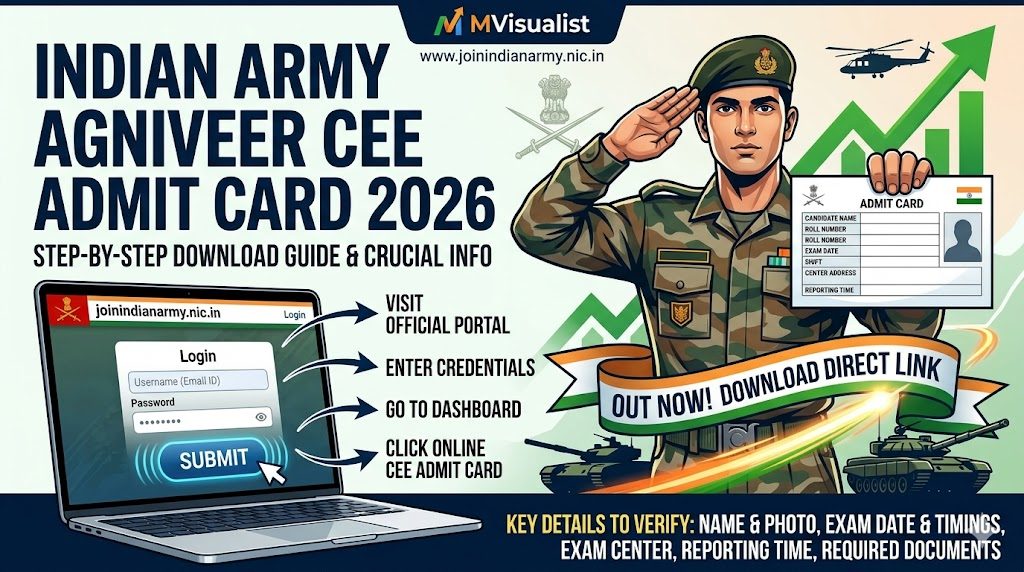
Indian Army Agniveer CEE Admit Card 2026 Out: Direct Download Link & Step-by-Step Guide
Attention all defence aspirants! The wait is finally over. The Indian Army has officially released the Indian Army Agniveer CEE Admit Card 2026 for Phase 1 of the recruitment process. Candidates who have successfully registered for the Agniveer General Duty (GD), Technical, Clerk, and Tradesman categories can now download their hall tickets.
The Common Entrance Exam (CEE) is the crucial first hurdle in your journey to donning the prestigious olive green uniform. In this comprehensive post on mvisualist.com, we bring you the official data, a direct download link, and essential guidelines to ensure your exam day goes flawlessly.
Army Agniveer 2026: Important Dates & Overview
Before diving into the download steps, let’s look at the crucial timeline for the Indian Army Agniveer 2026 recruitment cycle:
| Event | Important Dates (2026) |
|---|---|
| Conducting Body | Indian Army |
| Exam Name | Agniveer Common Entrance Exam (CEE) |
| Admit Card Release Status | Released (Out Now) |
| Agniveer CEE Exam Dates | Refer to your respective Admit Card |
| Official Website | joinindianarmy.nic.in |
How to Download Army Agniveer CEE Admit Card 2026?
Downloading your admit card is a simple process if you follow these steps carefully. Make sure you have a stable internet connection and your login credentials handy.
- Visit the Official Portal: Go to the official Indian Army website at joinindianarmy.nic.in.
- Clear the Captcha: Upon entering the site, you will be prompted to enter a captcha code to access the main homepage.
- Navigate to JCO/OR Login: Click on the “Agnipath” tab on the main menu, then select “Login In / Apply Online”.
- Enter Your Credentials: Enter your registered Username (Email ID) and Password, along with the captcha code displayed.
- Go to Dashboard: Once logged in, look at the left-hand menu and click on the “Online CEE Admit Card” section.
- Download and Print: Your admit card will be displayed in PDF format. Download it and take a clear, legible printout (preferably in color).
To make it easier for you, we have provided the official login link below. (Note: This link will open in the same window, so make sure to save our mvisualist.com page first!)
Click Here to Download Agniveer CEE Admit Card 2026 (Official Link)Crucial Details to Check on Your Hall Ticket
As soon as you download the Agniveer CEE Admit Card, verify the following details to ensure there are no discrepancies:
- Candidate’s Full Name and Photograph
- Roll Number and Registration Number
- Category Applied For (GD, Tech, Clerk, etc.)
- Exact Exam Date and Shift Timings
- Reporting Time and Gate Closing Time (Do not miss this!)
- Complete Address of the Examination Center
Important Documents to Carry to the Exam Center
The Indian Army is extremely strict regarding exam day protocols. If you fail to bring the correct documents, you will be denied entry. You must carry:
- Printed Copy of the Admit Card: A clear laser printout is highly recommended. Do not fold or smudge the barcode/QR code on the paper.
- Original Photo ID Proof: Carry your Aadhaar Card, PAN Card, or Voter ID. The name and Date of Birth must exactly match the details on your admit card.
- Passport Size Photographs: Keep at least 2 recent color passport-size photos with you.
- Transparent Water Bottle & Ballpoint Pen: (Check your specific admit card instructions regarding pens, as sometimes they are provided at the center).
Note: Electronic gadgets, smartwatches, Bluetooth devices, and calculators are strictly prohibited inside the exam premises.
Frequently Asked Questions (FAQs)
1. What should I do if I forgot my Join Indian Army login password?You can easily recover it. On the login page, click on the “Forgot Password” link. Enter your registered email ID, date of birth, and matriculation (10th) certificate number to reset your password.
2. Can I show the admit card on my mobile phone at the center?No. Digital copies are strictly not allowed. You must carry a physical, printed copy of your Agniveer CEE Admit Card to gain entry into the examination hall.
3. Is there negative marking in the Agniveer CEE Exam 2026?Yes, there is a negative marking scheme. Generally, 25% of the marks assigned to a question are deducted for every incorrect answer. Check the official syllabus and exam pattern for your specific trade for detailed marking schemes.
Final Advice from mvisualist.com
Phase 1 is a test of your mental endurance and preparation. Do not try to learn new topics at the last minute. Revise your notes, practice mock tests, get adequate sleep the night before the exam, and arrive at your center well before the reporting time.
For more authentic updates on answer keys, result declarations, and Phase 2 (Rally) schedules, keep visiting mvisualist.com. Jai Hind, and all the very best for your exams!