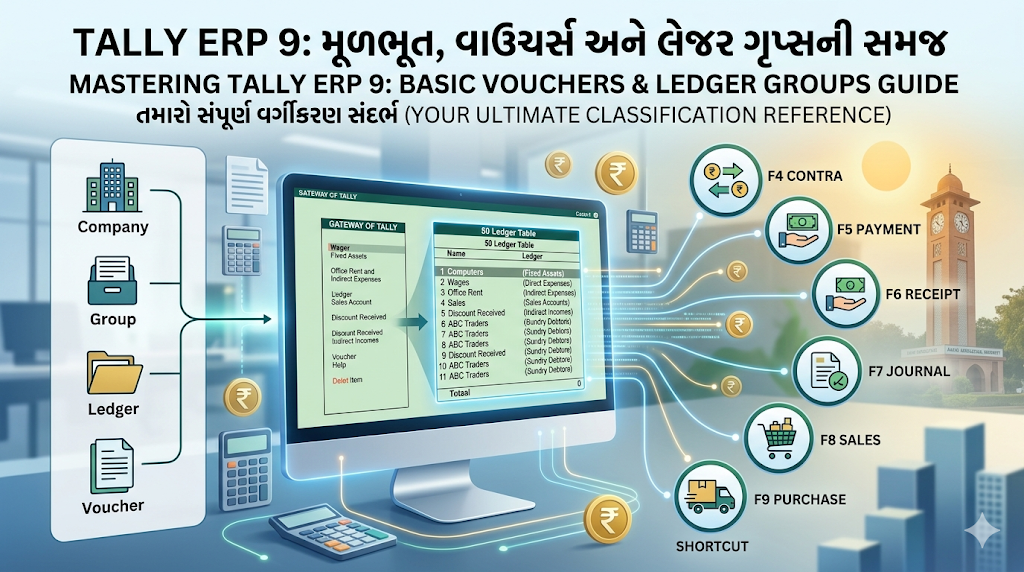
If you are stepping into the world of computerized accounting, Tally ERP 9 is your best friend. Used by millions of businesses worldwide, it transforms complex financial record-keeping into a fast, automated, and error-free process.
Whether you are an accounting student, a business owner, or an aspiring data entry operator, this guide will walk you through the absolute basics of Tally, how to use its Vouchers, and how to categorize your business accounts correctly.
The Basics of Tally ERP 9
At its core, Tally ERP 9 operates on a very logical, hierarchical structure. To work effectively in Tally, you need to understand these four fundamental pillars:
- Company: This is your digital workspace. Every business you account for must first be created as a “Company” in Tally.
- Groups: Think of these as main filing cabinets. Tally comes with 28 pre-defined groups (15 Primary and 13 Sub-groups) that classify the nature of the account (e.g., Fixed Assets, Direct Expenses, Capital).
- Ledgers: These are the individual file folders inside the cabinets. Every transaction you make involves at least two ledgers (e.g., “Cash A/c” and “Sales A/c”).
- Vouchers: The actual pieces of paper (digital forms) where you record daily transactions.
Vouchers in Tally and Their Usage
A voucher is a document that contains the details of a financial transaction. Tally has different types of accounting vouchers, each designed for a specific kind of business activity. Using the correct voucher is crucial for accurate reports.
Here are the primary accounting vouchers you will use every day, along with their keyboard shortcuts:
- Contra Voucher (F4): Used ONLY for internal funds transfers involving Cash and Bank.
- Example: Depositing cash into the bank, withdrawing cash from the bank for office use, or transferring money from one company bank account to another.
- Payment Voucher (F5): Used for all money going OUT of the business.
- Example: Paying office rent, paying supplier dues, or purchasing a computer using cash/bank.
- Receipt Voucher (F6): Used for all money coming INTO the business.
- Example: Receiving a cheque from a customer, or the owner introducing capital into the business.
- Journal Voucher (F7): Used for non-cash transactions and adjustments. No cash or bank ledger is involved here.
- Example: Purchasing machinery on credit, recording depreciation, or adjusting outstanding expenses.
- Sales Voucher (F8): Used strictly for recording the sale of goods or services.
- Example: Selling 10 laptops to a customer (whether for cash or on credit).
- Purchase Voucher (F9): Used strictly for recording the purchase of goods or inventory meant for resale.
- Example: Buying raw materials or trading stock from a wholesale supplier.
The Ultimate Ledger Grouping Guide
The most common mistake beginners make in Tally is putting a ledger into the wrong “Under Group.” If you classify Rent as a “Direct Expense” instead of an “Indirect Expense,” your Gross Profit will be completely wrong!
Here is a comprehensive reference table of 50 common business ledgers and the exact Tally Group they belong under. We have included examples across all major accounting categories.
| S.No. | Account Name (Ledger) | Under Group in Tally |
|---|---|---|
| 1 | Owner’s Capital A/c | Capital Account |
| 2 | Owner’s Drawings A/c | Capital Account |
| 3 | Life Insurance Premium (Owner) | Capital Account |
| 4 | State Bank of India A/c | Bank Accounts |
| 5 | HDFC Bank Overdraft A/c | Bank OD A/c |
| 6 | Cash A/c (Default Ledger) | Cash-in-Hand |
| 7 | Petty Cash A/c | Cash-in-Hand |
| 8 | Land & Building A/c | Fixed Assets |
| 9 | Plant & Machinery A/c | Fixed Assets |
| 10 | Office Furniture A/c | Fixed Assets |
| 11 | Computers & Printers A/c | Fixed Assets |
| 12 | Delivery Van A/c | Fixed Assets |
| 13 | ABC Traders (Customer) | Sundry Debtors |
| 14 | XYZ Wholesalers (Supplier) | Sundry Creditors |
| 15 | Purchase A/c | Purchase Accounts |
| 16 | Purchase Return A/c | Purchase Accounts |
| 17 | Sales A/c | Sales Accounts |
| 18 | Sales Return A/c | Sales Accounts |
| 19 | Factory Wages | Direct Expenses |
| 20 | Carriage Inwards / Freight In | Direct Expenses |
| 21 | Factory Power & Fuel | Direct Expenses |
| 22 | Coal & Gas | Direct Expenses |
| 23 | Import Duty | Direct Expenses |
| 24 | Office Salary A/c | Indirect Expenses |
| 25 | Office Rent A/c | Indirect Expenses |
| 26 | Telephone & Internet Charges | Indirect Expenses |
| 27 | Printing & Stationery A/c | Indirect Expenses |
| 28 | Advertising & Marketing | Indirect Expenses |
| 29 | Bank Charges A/c | Indirect Expenses |
| 30 | Audit Fees | Indirect Expenses |
| 31 | Staff Welfare Expenses | Indirect Expenses |
| 32 | Carriage Outwards / Freight Out | Indirect Expenses |
| 33 | Bad Debts A/c | Indirect Expenses |
| 34 | Depreciation A/c | Indirect Expenses |
| 35 | Commission Received A/c | Indirect Incomes |
| 36 | Discount Received A/c | Indirect Incomes |
| 37 | Interest on Bank Deposits | Indirect Incomes |
| 38 | CGST A/c | Duties & Taxes |
| 39 | SGST A/c | Duties & Taxes |
| 40 | IGST A/c | Duties & Taxes |
| 41 | TDS Payable A/c | Duties & Taxes |
| 42 | Bajaj Finance Loan A/c | Secured Loans |
| 43 | Loan from Friend/Relative | Unsecured Loans |
| 44 | Investment in Mutual Funds | Investments |
| 45 | Shares in Tata Motors | Investments |
| 46 | Security Deposit (Electricity) | Deposits (Asset) |
| 47 | Prepaid Insurance A/c | Current Assets |
| 48 | Advance given to Staff | Loans & Advances (Asset) |
| 49 | Outstanding Salary A/c | Current Liabilities |
| 50 | Provision for Bad Debts | Provisions |
Pro Tip: If you ever get stuck wondering where an expense goes, ask yourself: “Does this expense happen inside the factory/purchasing phase (Direct) or inside the office/selling phase (Indirect)?” Mastering these ledgers and vouchers will give you a rock-solid foundation for tackling any accounting task in Tally ERP 9.